Tee Support 24/7 Online Computer Expert can Help You out of All the Computer Virus!

Showing posts with label Malware removal. Show all posts

Sunday, January 31, 2016

Get Rid of “Warning! Virus Invasion Detected!” with Easy Methods

Are you bothered by “Warning! Virus Invasion Detected!” pop-up when surfing the Internet? Do you know why it appears? Are you believed what it states? More information and relevant removal guide in this post.

Details of “Warning! Virus Invasion Detected!”


It means that your computer is infected by malware or potentially unwanted programs when “Warning! Virus Invasion Detected!” pop-up appears on your system. If you have free download, click unknown hyperlink, visit intrusive website, open spam emails or attachments, malware or PUP will be possibly in your computer and then cause this bogus warning. As a result, you had better to keep a distance from them to guard against the infections of malware or PUP and the appearance of the bogus security warning.

Sunday, January 17, 2016

Remove "web page needs to be recovered because it is not responding" Pop-up with Practical Methods

When "web page needs to be recovered because it is not responding" message keeps popping up on Internet Explorer, Google Chrome, Mozilla Firefox, Opera, or Safari, your laptop or desktop has been hijacked by computer threats such as malware or other potentially unwanted programs. As a result, you had better to scan your system with security tool and then find and remove all threats causing this pop-up to save your system.

Thursday, January 7, 2016

Get Rid of Alltechmate.com & Its Pop-up (Bogus System Warning) from Infected Laptop or Desktop

When you are redirected to alltechmate.com and see the pop-up about system alert, you have to be watchful because your computer has been hijacked. Please focus on this post to get methods to remove all threats.

The Basic Introduction of Alltechmate.com and Its Pop-up


Alltechmate.com, a spiteful and unreliable website, is used by cyber criminals or scammers to send you system alert. As a matter of fact, the pop-up from alltechmate.com is associated with a bogus system alert (Tech Support Scam). Keep in mind that never call the recommended helpline for technology support. The so-call technology assistance is non-existent and you cannot get aid from it.

Best Methods to Remove Error code 80070570 Pop-up-Tech Support Scam Removal Guide

 Yesterday, I got a pop-up about Error code 80070570. Since its appearance, my laptop is in troubles. Should I do as it says to call its helpline for technological support? I need suggestions.

The Basic Information of Error code 80070570


When Error code 80070570 pop-up appears on screen, target system is possible to be intruded by malware or potentially unwanted programs, used by scammers to frighten victim and them mislead them to use the recommended technology assistant with large of money. When worrying much about its computer security, one will be easy to believe this pop-up and do as it says. 

Monday, December 14, 2015

Eliminate "Application error: referenced memory could not be read" Pop-up

Can you get the pop-up about "Application error: referenced memory could not be read"? Why it appears on your screen? Please read this post to find the answer!

About "Application error: referenced memory could not be read" Pop-up


When seeing "Application error: referenced memory could not be read" pop-up in your computer, unfortunately, your computer is surely infected by malware or potentially unwanted programs (PUP). That is to say, its existence makes you have to be confronted with all possible issues caused by PUPs causing its infection.

The Screenshot of Application error

Wednesday, December 2, 2015

Get Rid of "Current security settings find this program ,..harmful" Pop-up from Infected Laptop or Desktop

Victim: Windows gives me "current security settings find this program ,..harmful". I am unable to download any software coming from Microsoft or Adobe flash upgrades. What happens? What should I do to break away from this problem?

The Analysis of "Current security settings find this program ,..harmful" Pop-up


When you get the message of "Current security settings find this program ,..harmful", your laptop or desktop may be intruded by malware or potentially unwanted program (PUP) that you may get it when you download third-party software or get in touch with suspicious things (Spam emails or pornographic websites), or when your system has security holes.

Easy Guides on How to Remove“Error Code: Site you are visiting contains Malware” Pop-up-Fake Security Warning Removal Guide

Have you thought why pop-up about “Error Code: Site you are visiting contains Malware” appears on your screen? What it wants from you? Are you clear how to make this pop-up disappear from your system? Please follow this article and get exactly what you want.

The Description of “Error Code: Site you are visiting contains Malware” Pop-up


It means that your laptop or desktop is infiltrated by malware or potentially unwanted program (PUP) if you keep getting “Error Code: Site you are visiting contains Malware” pop-up. As a matter of fact, “Error Code: Site you are visiting contains Malware” pop-up is a bogus system security alert that is created by hackers to scam your money. Mind you that this pop-up intends to persuade you to pay for its recommended technology support via calling the given helpline. Nevertheless, you get nothing but pay for it.

Monday, November 30, 2015

Get Rid of Herr1.9939115.info Pop-up-Fake Security Alert Removal Guide

How do you do when guided to herr1.9939115.info and see the security alert from it? Please read and focus on this message to get exactly what you want.

Know More about Herr1.9939115.info


Herr1.9939115.info is a deemed to be a baleful site because it is able to guide your to its domain, send you bogus security alert in forms of pop-up, and then scan you money via convincing you to purchasing its technology support.
 
The Screenshot of Herr1.9939115.info
 

The Channels Herr1.9939115.info Enter into Your Computer


In general, Herr1.9939115.info is in a position to infiltrate into your system when you have inappropriate online activities or there are system security vulnerabilities and holes in your system. In addition to this, spam emails, intrusive sites, sponsored ads, or unknown hyperlinks are conducive to the infection of Herr1.9939115.info.

As a result, you had better to spare no effort to get rid of it from your computer when your computer is invaded by it. Nevertheless, it is not enough. What you also should do is to take steps to guard against it second infection. In line with the suggestions of experts, you should first pay attention to your online activities. And then, protect and scan your computer with a powerful anti-spyware tool. Last but not the least, it is also important to fix your system vulnerabilities and holes.

Methods to Remove Herr1.9939115.info from Your PC


Method A: Manually Remove Herr1.9939115.info

Step1.Uninstall Herr1.9939115.info from your Control panel

For Windows 7


1. Click on Start button;

2. Hit Control Panel;
3. Switch to Uninstall a program;
4. Find out the malicious program;
5. Uninstall the unwanted software.

For Windows 8

1. Click on Start button;
2. Select Search from the list and search for “control panel”
3. Switch to Uninstall a program;
4. Find out the malicious program;
5. Uninstall the unwanted software.

For Windows XP

1. Click on Start button;
2. Press Control Panel;
3. Go to Add or Remove Programs;
4. Choose suspicious installer in the “Currently Installed Programs” window
5. Switch to Change or Remove.


Step2. End up all the processes of Herr1.9939115.info in Windows Task Manager

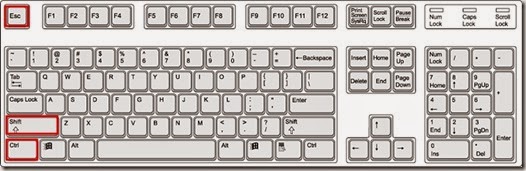
1. Go to Windows Task Manager by press Ctrl+Shift+Esc on the keyboard


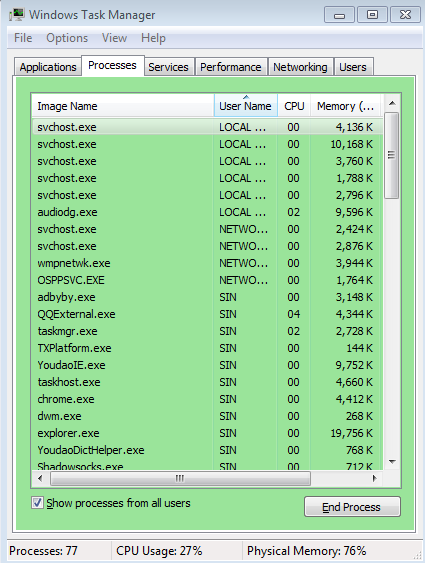
2. Find the Process, look for all malicious processes related to Herr1.9939115.info , and then hit End process to delete all malicious processes and files.


Step3. Delete Herr1.9939115.info in registries.

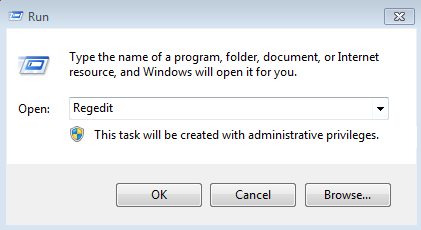
1. Press “windows” + “R” to load the Run dialog box

2. Type “regedit” in Runbox and clicking OK to open Registry Editor.


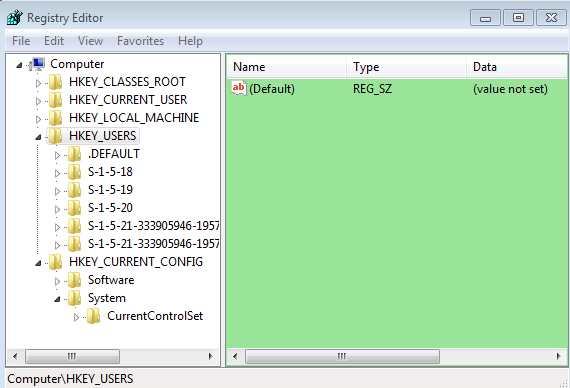
3. After Registry Editor, you can glance through all files in your computer, and then find out all listed hazardous items. 


4. Right click on malicious items and click Delete to Remove.


If you cannot get help from the manual removal guide, you can take consideration to download Spyhunter, a powerful auto-security tool here


Method B: Automatically Remove Herr1.9939115.info


SpyHunter is a real-time anti-malware program and automatic removal tool, which is able to do a lot of things for you.
  1. Detect and remove the latest malware attacks, such as worms, rootkits, and so on.
  2. Protect your PC from varieties of infections and threats all the time.
  3. Allow you to restore backed up objects
 
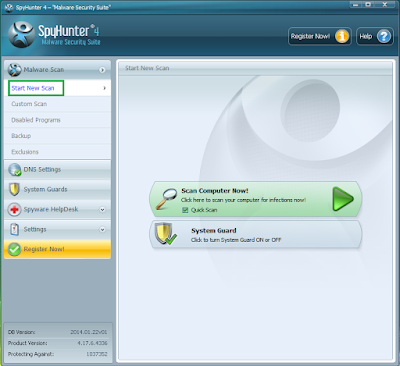
Step 1. Download SpyHunter into your machine.

1. Press the following button to download SpyHunter and its files.

http://www.pc-superman.com/ylhi/spyhunter.php

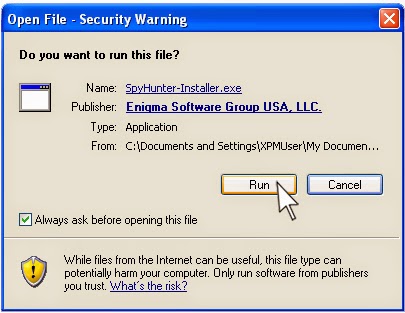
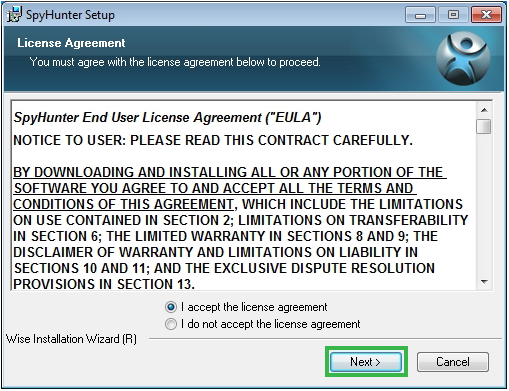
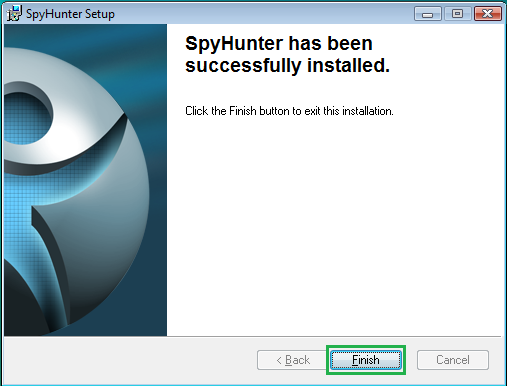
2. Click Run to install the files related to SpyHunter step by step.


Step 2. Use SpyHunter to get rid of Herr1.9939115.info from your machine.

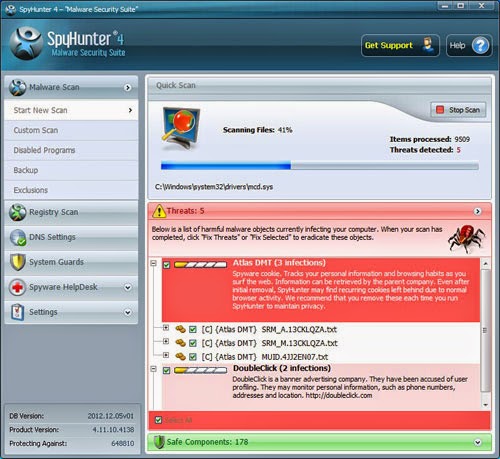
1. Scan and detect your PC system automatically with SpyHunter when finishing the installation.

 
2. It costs some time for the first scan, and please patiently wait for the scanning result.


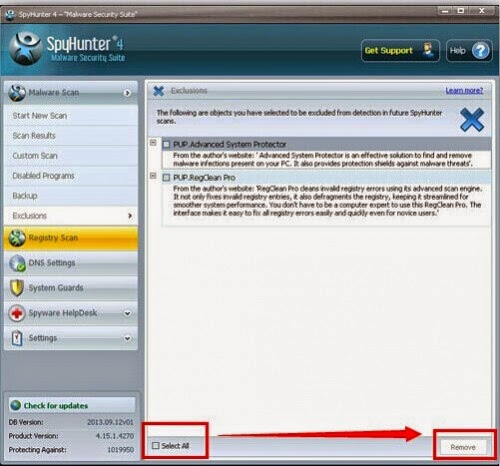
3.  After detecting all the threats in PC successfully, please check Select All, and then click Remove button to get rid of all threats in your PC.


Recommendation:

After breaking away from potentially unwanted program, you had better to optimize your computer and detect other file with RegCure Pro.
 
 What can RegCure Pro do for you?
  • Fix system errors
  • Improve startup
  • Defrag memory
  • Clean up your PC

Step1.  Download RegCure Pro.

 http://www.pc-superman.com/ylhi/regcure.php

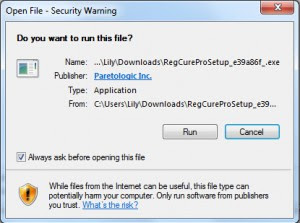
Step2. Hit Run to install the relevant grogram step by step.


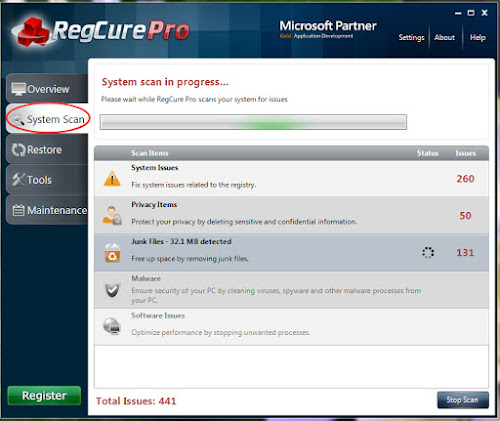
 Step3. Scan computer system to find out suspicious files by going on Overview.
 
 
Step4. After scanning, you can find the malicious file, which can be handled by clicking Fix.


Note:  If you are a novice in PC operation, you can install SpyHunter to help you dealt with this PUP, as well as protect your PC from it and similar threats. Moreover, you can opertimize your system with  RegCure Pro.


Thursday, November 19, 2015

Easy Methods to Remove Feedbackexplorer.com Pop-up-Adware Removal Guide

Do you receipt the pop-up from feedbackexplorer.com when entering into Google Chrome? Do you trust what the pop-up says? Read the post and get help to stop the pop-up forever.

The Analysis of Feedbackexplorer.com


When seeing the feedbackexplorer.com pop, unfortunately, your system is surly intruded by malware. You can see the contents what the pop-up states in the following:

Dear Chrome Users,
You have been selected Tuesday 17 November, 2015
Take 30 seconds to answer 4 short questions on our anonymous survey and stand a chance to win iPhone 6/ iPad Pro!


In reality, feedbackexplorer.com pop is a spiteful site, provided with the features of as-supported program. Thus, its pop-up always display on your screen. Besides that, you may be confronted with additional threats, slow system performance, and so on.

How to Remove Pcmaintenance247.com Pop-up from Your Windows?

Guided to pcmaintenance247.com? See system security alert from pcmaintenance247.com? If confronted with the same issues, you have better to follow this post to get rid of all the problems from your system.

Details of Pcmaintenance247.com


Pcmaintenance247.com is a malicious site, triggered by malware or potentially unwanted program (PUP). When it lands on your system, you will be guided to this site as well as see its system security alert pop-up stating that your system is infected by virus. Certainly, in this pop-up also advise you to call its immediate technology support for help. I have to mind you that all it says is bogus and you cannot get help from its recommended services.

Tuesday, November 17, 2015

How to Remove Adwaresystemscanner.com & Fake Security Warning?

Have you been tricked by the security alert from adwaresystemscanner.com? Does the alert pop-up still haunt you? In this message you can get help.

The Details of Adwaresystemscanner.com


Adwaresystemscanner.com is a bogus security alert pop-up stating that your computer detect suspicious and illegal activities as well as recommending technology support via calling an online helpline. It seems to be right so that many inexperienced computer users believe what it says and follow it suit to buy its recommended paid online services.

Practical Methods to Remove 9939110.info Pop-up-Removal Guide for Scam

If you are guided to 9939110.info without your approval, if you are haunted by its pop-up every time surfing the Internet, this message is your good choice to break away from all issues caused by this site.

The Knowledge of 9939110.info


When see the pop-up from 9939110.info, your computer is possible to be intruded by potentially unwanted program (PUP) or malware. In reality, 9939110.info pop-up is a tech scam support, published to cheat your money via sending your fake security warning. Its infection is a big issue for you.

Monday, November 9, 2015

How to Remove Dotnetfx40_client_x86_x64.exe / aecore.dll from Infected PC?

Do you see dotnetfx40_client_x86_x64.exe / aecore.dll when you scan your system with security program? Are there any abnormalities for your security? Want relevant countermeasure to deal with this problem? Please watch out the article!

What is Dotnetfx40_client_x86_x64.exe / aecore.dll?


Dotnetfx40_client_x86_x64.exe / aecore.dll is actually a system scan blockiert, appearing on your computer when you scan or detect your system using your anti-malware program. Mind you that its existence is caused by malware or potentially unwanted program (PUP).

Thursday, November 5, 2015

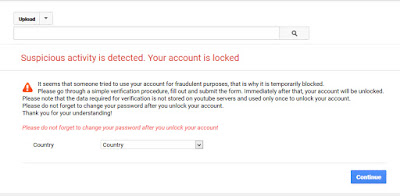
Remove “Suspicious activity is detected. Your account is locked” Pop-up

Can you see the alert “Suspicious activity is detected. Your account is locked” when surfing the Internet. Do you know why it appears on your system? Please read this article and you will get more surprises.

The Analysis of “Suspicious activity is detected. Your account is locked”


“Suspicious activity is detected. Your account is locked” may be caused by malware or PUPs. Usually malware or PUPs come from your system security vulnerability or other threats. All in all,
Spam emails, suspected attachments, links from uncharted provenance, or other suspicious things are conducive to the appearance of this alert pop-up, malware, or PUPs.

The Screenshot of “Suspicious activity is detected. Your account is locked”
 

Wednesday, November 4, 2015

How to Remove Securitye-x03-menace-v3-erreur.com/FR2815/ from Your Computer?

Are you guided to the page at securitye-x03-menace-v3-erreur.com/FR2815/ and see the pop-up about it when visiting Google Chrome or Mozilla Firefox? Is what it says true? Does it disappear forever when your close it? Please read this post to clear up all related doubts!

More Knowledge of Securitye-x03-menace-v3-erreur.com/FR2815/


Securitye-x03-menace-v3-erreur.com/FR2815/ is a malicious site in which you will receipt a bogus security alert stating that your computer is intruded by virus. As a matter of fact, this redirection is triggered by malware or adware. Consequently, you are not only faced with the annoying pop-up, but have to be haunted by a variety of issues brought by malware or adware.

Tuesday, November 3, 2015

Remove JS:ScriptPE-inf [Trj] and URL:Mal Infections from Your PC

A Complaint of JS:ScriptPE-inf [Trj] and URL:Mal Infections

The pop-ups about JS:ScriptPE-inf [Trj] and URL:Mal Infections always appear when I try to access Gmail and Google+ and visit Google Chrome. I remove the relevant malicious files form m computer with the aid of my security program. However, the pop-ups still keep popping up. I don’t what I should do facing this situation.

Details of JS:ScriptPE-inf [Trj] and URL:Mal Infections


It means that your computer is infiltrated by malware, adware, or potentially unwanted program (PUP) when JS:ScriptPE-inf [Trj] and URL:Mal Infections appears on your system. It is no doubt that you cannot know the exact time it steals into your computer until you are haunted by the problems trigged by it and the malware or PUP causing this infection. Generally speaking, it is capable of hiding in spam emails, unknown hyperlinks, or intrusive websites and then appears on your computer if you come into contact with theses suspicious things. In additional to this, it also able to here with the assistance system security vulnerabilities and free downloads.  

Friday, October 30, 2015

How to Remove Debug malware error 895-system32.exe failure Pop-up?

It means that your compute is invaded by adware or malware when you see Debug malware error 895-system32.exe failure pop-up in your computer. Just similar with 866-248-1415 pop-up and 1-855-746-0220 pop-up, it attempt to lure your into adopting its paid online services and scam money in form of showing your bogus security warnings stating that your system has suspicious activities or threats.

Usually, it is hardly for you to aware when it infects your computer, let alone the channels invading your computer. According to the analysis of some experts in computer operation, this error may appear when you download freeware, shareware, or third-party software, when your visit gamble and pornographic websites, when you open spam emails, or when you click links from uncharted provenance.

Tuesday, October 27, 2015

Get Rid of RelayKeeper.dll from Your PC-Removal Guide

Is RelayKeeper.dll in your Windows Task Manager recently? Can you feel any abnormalities or problems in your computer? Read this post to know more pertinent information.

The Analysis of RelayKeeper.dll


RelayKeeper.dll is a filename that is used by cyber criminals to spread malware to achieve their goals. When you find it in your computer, it has brought you a series of issues that is pointed out in the following.

It is able to create abnormalities in you Google Chrome, Firefox, or other browsers.
It is possible to make your system vulnerable add other threats into your computer.
It is capable of consuming your system CPU and Memory.
It can give you a degraded network speed.
It may keep popping up and guide you to other malicious or strange websites.

Monday, October 26, 2015

How to Remove “Dnsapi.dll file missing or corrupt” Pop-up from Your Computer?

Do you see the Alert “Dnsapi.dll file missing or corrupt” in your computer? Do you know why this warning appears? Please read and follow this post carefully and then your issues will be handled.
 

The Analysis of “Dnsapi.dll file missing or corrupt”


Dnsapi.dll belongs to DLL ("dynamic link library") file, existing in your Windows Task Manager. When you receipt these warnings such as “Dnsapi.dll file missing or corrupt”, “Cannot register Dnsapi.dll”, and “Cannot find C:\Windows\System32\\Dnsapi.dll”, your computer is surely infected by malware and security vulnerabilities may be in your computer. Can you image what problems you suffer when malware invades your computer? Your security program may be abnormal and there are diverse system errors in your computer.

Friday, October 23, 2015

Get Rid of Security Error Code 0x80070424 from Your Computer

Hi:  I am informed by a warning that I need to alter settings when I tried to access to a program in Windows Firewall. And then, I believe this warning and follow its suit to deal with the issues it mentioned. However, Error code 0x80070424 appears on my screen, stating that Windows Firewall can't change some of your settings. What is the matter with my laptop?

The Description of Security Error Code 0x80070424


Similar with Windows-defender-error-code-0x80073afc, Security Error Code 0x80070424 is caused by adware, malware, or potentially unwanted program (PUP). It also means that you have to tolerate all kinds of potential problems triggered by adware, malware, or PUP when you encounter it in your computer. As a result, I have to mind you that what you should do is to ignore what it says and close it and find the problem root when it infects your computer. This bogus warning is not worthy of your trust.